A close friend and coworker of mine had a school laptop she ended up accidentally shattering the screen on. Being that it was a budget laptop I opted not to replace the screen in it but still felt it shouldn’t be sent to the dumpster as she intended. After some hilarious flexing of the screen to get just enough of it visible to disable secure boot and to switch to USB boot so I could install Ubuntu server, I now have the first piece of my home lab setup.
Unfortunately my ISP (Internet Service Provider) doesn’t give me a true private IP address and therefore direct port forwarding is not an option for me to be able to access my server from the outside world. Fortunately free secure services like TailScale exist so after some quick configuration over SSH, I now have a server running 24/7 which I can access from anywhere securely.
For now it will be used to backup data, play with linux sever related things remotely, and server as a part of the network lab that I am building. In the future I plan to add a microcontroller to it via USB UART and then I will slowly add electronics to it to make something much more powerful than a Rasberry Pi ever thought about being. The first project I am planning to do with that is a 3d printed “sign” that will feature a clock, piezo buzzer for alarms, and several symbols which will have addressable “neo-pixel” leds underneath them for individual control – which will be ran by the server both autonomously and perhaps interactively if I wire in the LED Matrix that I have for messages.
For now though, all of this brings about an issue that is perhaps a matter of convenience. How can I easily sync files to my server in a convenient manner to keep all of my data consistent and backed up? You’ve come to the right place. First, do yourself a solid and create an SSH keypair for your local station so that you can put the public key on the server, and log in without passwords in the future. You can use a passphrase to add additional protection in the event your private key is compromised. I opted to store mine in the default location, after that you move the private key to the server with ssh-copy-id.

Now you’re ready to move the key over ssh-copy-id {Destination_name} and test login with ssh user@destination
Go back to your local pc with exit
Create a new nano (or if you’re sadistic and actually enjoy vim :0 go for it, any plain text editor) and I called mine PushServer.sh
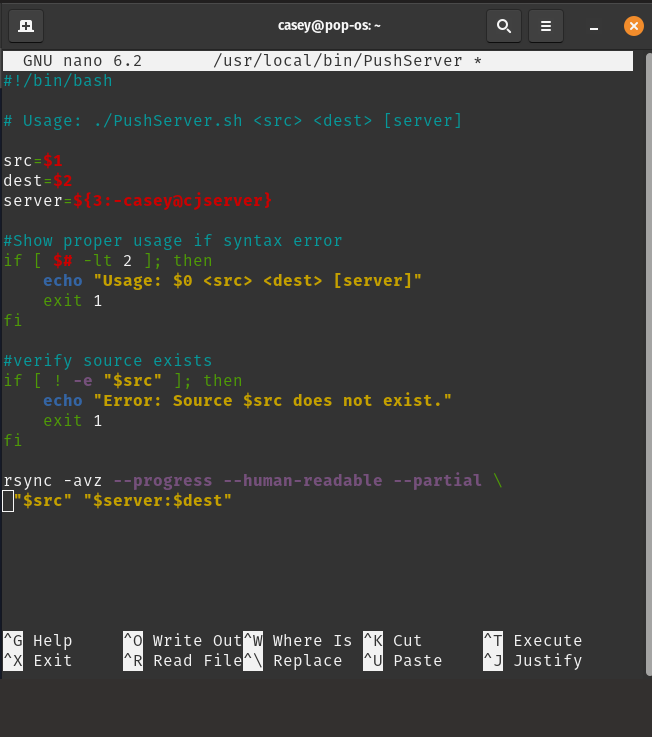
Now save that, and if you want to be able to run it anywhere save it under /usr/local/bin/ScriptName and then make it executable for testing and using 🙂
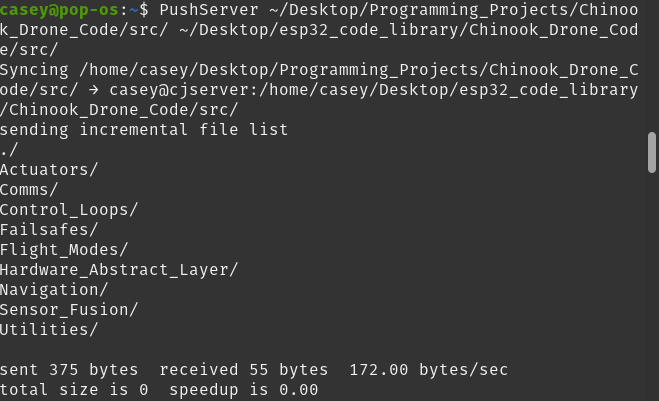
Here is an example usage of the script where I synchronized my recent work on my drone project which was just directory organization as its still in the assembly and wiring stages.