
Wireless Network Attacks
Different types of wireless network attacks was a topic covered during module 10 of the course work.
Through reading the book, reviewing the module, as well as the class / Powerpoint, I was able to gain a better understanding at what types of wireless network attacks are out there. The different types of wireless technologies being Wireless local area networks (like the wifi in your home), cellular (internet provided by your cell phone carrier), Bluetooth (used on many devices now not just cell phones), near field communication (devices brought very close or tapped together), and radio frequency identification (the bar codes that can be scanned to transmit information) can all be susceptible to some form of attack.
Wireless local area network attacks:
– Rogue Access point – is an access point set up by someone within an organization or on your home network that was connected without permission, basically allowing other devices into the network where it’s now created vulnerabilities for devices and users on that network.
– Evil Twin – is an access point set up by an attacker. They are attempting to replicate an access point that is allowed in order to trick users into connecting to it.
– Intercepting data – If an access point is not set up securely, the data transmitted across the network can be intercepted.
– Denial attacks – Jamming is one where somebody uses a device to disrupt transmissions across a network. Disassociation attacks is when someone sends false deauthentication or disassociation frames making it look like they’re coming from another device in order to cause a disconnection.
– Wireless consumer attacks – these come from improperly configured home routers where attackers can access data from computers connected to the router, intercept transmissions, install malware, download harmful content, etc.
Bluetooth attacks:
– Bluejacking – when unsolicited messages get sent to a device via Bluetooth. Not exactly harmful but can be annoying for the person receiving the messages.
– Bluesnarfing – when a Bluetooth connection is made without a user knowing, the attacker can take information off the victim’s phone or make copies of it.
Near Field Communication attacks:
– man in the middle attack – an attacker could receive the NFC communication from one device and send a false response back.
– theft by close proximity – in a crowded area if your device is out somebody could bump another device to it to make the NFC connection and then steal data off the phone.
– device theft – if a cell phone is stolen the person who stole it could use NFC on the device to purchase things.
One thing I found interesting when doing some further reading on this topic is that NFC attacks are up in 2025 according to an ESET Threat Report (Cuprik, 2025)
According to this article the NFC market is projected to go from $21 to $30 billion from 2024 to 2025. Knowing this, it is likely that attackers will try and find new ways to exploit this technology.
Radio Frequency Identification attacks:
– fake tags – someone could place / send out a RFID tag that sends anyone who scans it to a fictitious site that could steal data or get them to ‘purchase’ things that are not legitimate.
– theft – many items use RFID technology embedded into chips now such as credit cards, if you had a credit card in your back pocket / left sitting out on a table or something, somebody could attempt to ‘scan’ it with a device to obtain a contactless payment.
While looking into the prevalence of wireless attacks I came across an eye opening statistic. According to Statista, 40% of surveyed adults said they “encountered private data compromise as a result of using public Wi-Fi in a café or restaurant” (Statista, 2025). It turns out there are many other places where folks experience this too when using public Wi-Fi
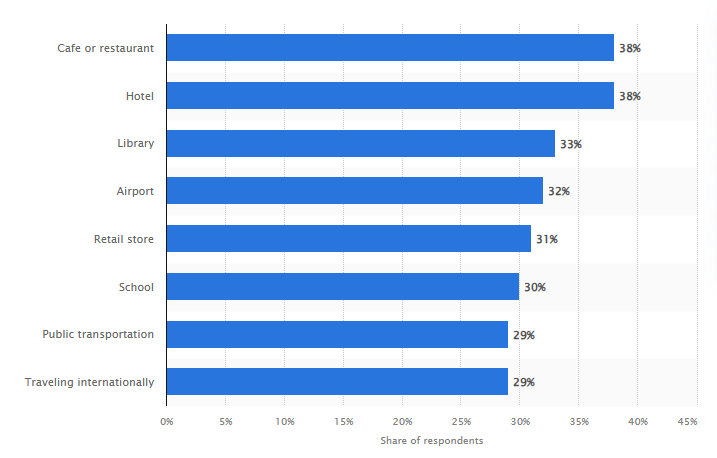
(Statista, 2025)
During this module we were assigned to do a simulation where we could use a wireless monitor tool. I went a step further and did the hands-on project contained in the module. I was able to see multiple Wi-Fi connections pop up when I ran the tool to which I would assume the ones I did not recognize are my neighbors. I also noticed other things on there such as printers / televisions etc. and was able to see things like the device’s MAC address and many other pieces of information. This was an eye opener for me because It just goes to show how many tools are out there that can discover and give info on wireless devices. Plus this tool is free and usable within a matter of seconds.