Jermiah Robinson
December 1st, 2025
Old Dominion University – IT Help Desk
CYSE 368 – 15101
Fall 2025
With my time now conclude and have reached the total three hundred hours, there are still multiple skills and situations that I have not gone over fully yet. With new cases such as software licenses not working to fights with other staff over the phone, there is always something new happening every day at the IT Help Desk. With my time as a Student Lead, I have seen many problems and many solutions to them as well during my days there, and I would like to go over what I have learned and what skills I was able to gain from those situations. I was incredibly happy to start work in IT, being one of my favorite subjects and a career opportunity for me in Cybersecurity
From my time at the Help Desk, I have gained key skills with working in the environment with the users and employees, especially with my leadership. With multiple new incidents coming in every day and us having to learn and understand new software from the Eastern Virginia Medical School, I must assist all staff here with their user and how their accounts work with ODU. Even now, the school is still migrating to ODU’s systems. New software has a significant impact on us, especially with having to now create new knowledge bases and templates for our employees to use when troubleshooting. Since I am a Student Lead, I am one of the number one resources to contact when a co-worker needs assistance troubleshooting with a user or even just asking a question about it. Having leadership skills is crucial when it comes to this position as I must lead all the other student technicians, especially with certain incidents that a quick reply cannot fix. Demonstrating leadership is an everyday experience that I do as a Student Lead, and I always will maintain my leadership even after this internship experience. With how many trainings I have done over the 300-hour period and how many student technicians I have prepared for the job, I feel that I have done a fantastic job at the position and hope to continue with it further. From my trainings, I have shown student workers exactly what to do against scenarios that require more work compared to template responses. I have had the workers type up their own responses as well for certain incidents that required them to think outside of the box. While the responses were not as strong as expected, the student workers continued to work on their responses until they were able to type up a nicely worded response to an EVMS employee who needed assistance with their Bioraft account. My supervisor, Stefan, was impressed with what I was able to make them do after our training sessions with the new employees, and he was happy to see my leadership skills improving with the IT Help Desk overall.
Problem resolution is another particularly important skill to keep track of when working at the help desk. Multiple problems will arise that cannot be resolved easily or require more troubleshooting to resolve the issue. Sometimes error messages will appear that require extensive research and googling to discover a potential solution that might not even work with the specific problem. Having problem resolution down allowed me to resolve incidents that other Help Desk employees were having problems or otherwise cannot solve at all without aid from a higher up employee. Problem resolution is a skill we use every day and even for the most minor of calls, problem resolution is a technique we deploy to ensure that the user will not only be happy after we fix the issue but also prevent other problems from arising after implementing a solution. When tied with leadership, problem resolution makes me the center of attention when problems that we have no information or no knowledge base about arise at the Help Desk. When this happens, I take charge of the incident or call right away and do as much as I can to not only research the problem but investigate permanent solutions that could prevent this problem from happening again in the future. After the solution is implemented, I work with our staff team to create a knowledge base for our employees to fall back on if another incident were to come back up that requires the solution I discovered to fix. One prime example of this was when a user called the Help Desk about being unable to log into their Outlook email account. After gathering a screenshot of the error message and troubleshooting with the user after searching up the error code and message, we were able to discover that the user at some point had added their school email address to Windows. By adding the account here, it throws off Microsoft and further logins or attempts to login through the app will throw an error message and prevent signing in. The user felt very thankful that we were able to discover the solution to this incident, and I informed my supervisor to create a knowledge base to address the problem.
Communication is another necessity, and I was able to further develop that skill with my co-workers and users with the Help Desk. While describing problems by text is easier, problems being brought in person to the Help Desk or over the call can be harder to troubleshoot compared to us just typing a quick response to a question or issue. Calls are constant at the Help Desk, and there is never a day without someone reaching out to our number with a problem that they cannot resolve on their own without further assistance from us. I demonstrate the improvement of this skill through calls and talking overall as I have a bad stutter that affects me greatly when talking, but I have shown improvement with this stutter since I have been here, and I managed to develop a calmer tone when talking to users and others within the Help Desk. Communication is extremely important as calls are quite common and require your communication to be perfect to give proper information and easy to understand for the user when trying to hear what to do next. One of these cases was when a co-worker started to get angry from a walk-in with a user who was having problems with their phone. I took over the walk-in and asked if I could have the phone for a moment while my co-worker described the problem to me. I realized what was happening was that the user could not connect to our network because their network settings had been changed. I asked the co-worker what had happened to the network settings, and the co-worker told me that they had changed some of them to see if that would help with setting up their Wi-Fi connection with MonarchODU. I immediately noticed that things were wrong, and I informed the user that I would reset their network settings to have it go back to default. After doing this, I informed the user about their device and what network configurations that they would have to do to connect to MonarchODU or eduroam. I pulled up our page with our networks and described the problem and configuration that the user would have to do to connect. After walking the user through the steps, the user was still having problems with our network. After checking their account, I noticed that their password was also expired. The user had no idea this was also impacting their sign in to our network and informed the co-worker that they should have also checked MIDAS to see if the user was having problems with their password too. After having the user verify their identity with me and had them change their password, I informed the user that their new password will not work right away with their email and other Microsoft services. The user informed me that they were about to do that after getting access to the network and was thankful that I was able to handle this problem in a well-mannered tone. I continued to assist the user with logging into our network, and the user thanked me again as they were finally able to connect to MonarchODU to work on their project. The user thanked me once more and was happy about my professionalism and left with their device connected and their password reset on their account so they could continue to use ODU’s services. I informed my co-worker what happened overall and what to do the next time that this happens in the future. I also walked them through our knowledge base that has an article all about our network configurations and what to do on certain devices like Chromebooks or android devices that require more configuration to set up the network. The user left a review afterwards and my supervisor notified me of my performance so far with the month.
These three skills have been a large part of my job at the IT Help Desk and while I continue to strive with my improved leadership, problem resolution, and communication, various other skills have been a large part of my job as well. Expanding on problem resolution, there are times in which users may get too angry or upset with a response that a co-worker may have made or a mistake that turned into a much larger issue. While problem resolution is for finding solutions to incidents that require more thought behind it, I also needed to learn how to manage conflicts that can arise at the help desk. Recently, we had a student who was angry at the Help Desk due to their incident being closed. In this case, the incident was closed due to there being no response for about 2 weeks. The user came in and started yelling, demanding a supervisor meet with them and discuss this issue personally about why their incident was closed. Since all my supervisors had left the office at the time since it was around 6PM, there was no one above me that could manage this. My co-worker was shocked by the swearing from the user, and he was not going to calm down without anyone stepping up to answer him. Since I was the next person at the top, I stood up and called the user to my desk to explain everything that had happened in that incident. The user quickly started to yell back at me about how they were on vacation during the time and demanded that I open the incident again. I explained to the user that since the incident was already closed, the ticket could not be re-opened now. I informed him however that a closed incident does not mean that the incident has been ignored by the Help Desk, and even with it being closed, we can still troubleshoot the issue, especially now that they are in person at the help desk. The user was about to yell again but took a deep breath and relaxed a little after hearing my words. I explained to the user that while the incident may be closed, another one can be opened with the same issue, and this time we can hopefully resolve it right here. After pulling up the user on MIDAS, I noticed that their Duo Mobile was set up improperly, resulting in the user struggling to login to the ODU Portal and LeoOnline due to their Duo Mobile being setup this way. I quickly had the user head to our guest computers and had him log into MIDAS to manage their user account. We noticed that on their account, an iCloud Keychain was registered but there was no phone number. Without a phone number being set up and having a different authentication method, this resulted in the user being completely locked out of their account and stuck with needing a bypass code to login to those pages. I informed the user exactly what was going on and removed the iCloud Keychain from their account. Afterwards, I had the user head over to his two-factor authentication page on MIDAS and had him re-set up his phone. After finally completing the setup procedure and adding the account back on Duo Mobile, the user was able to finally sign into their account and was finally able to pay his tuition and finish setting up his courses to take next semester. I managed to make the user go from an incredibly angry and screaming user to a relaxed and satisfied one after walking the user through everything that was going on. My co-workers were able to feel relieved afterwards as the user walked out of the room. I looked over at my co-workers and felt relieved as well after overseeing an explosive person like that. They thanked me for stepping up in this case and taking over the walk-in myself instead of letting them struggle to explain what was going on. My other co-worker at the desk feared managing the situation and said that they would make it worse, instead of being able to solve the issue. I quickly informed them that even if a user was incredibly angry with us, we can still do our best to troubleshoot the issue until they finally relax after seeing the solution being given to them. The co-worker nodded and thanked me for being here to support everyone at the help desk. I thanked them though for sticking around and pushing through the toughest of times with managing all the tickets and calls that we get throughout the day and night.
While that was only one example of the certain scenarios that the Help Desk faces, there are many more that occur each day that we oversee constantly. From phishing incidents to wide scale outages and management, we all learn in the end that we work best as a team in these cases. Major incidents happen when three or more tickets are made in a brief time about a certain matter that the Help Desk cannot resolve at all, especially wide scale outages like the Amazon Web Service breaking down for a brief period. When a service like this goes down, the IT Help Desk cannot do anything at all to otherwise fix or prevent this issue from happening again. In these cases, we create a template that we all use in response to these matters that the IT Help Desk cannot fix.
One of these majors occurred at the Eastern Virgina Medical School. An incident occurred that resulted in the entire network for the campus going down, resulting in many tickets and incidents being created about this problem. Our networking team was notified right away and was dispatched to the EVMS campus to address the issue. The calls were constant, and numerous tickets came into the Help Desk about fixing this issue with the network or the inability to connect to it. During these periods, I quickly got in communication with my supervisor and the rest of the Help Desk about creating a major template to keep up with the tickets that were coming in. I created a little template and sent it to my supervisor, which he reviewed and told me that he had published it to all users of the Help Desk. The template informed the user that the problem has been taken in account and that our networking team is enroute to resolve the issue. The template also informed the user to be mindful that no ETA has been established yet, but to keep an eye on their network to see if they can reconnect. After around 30 minutes of responding to tickets with the template and informing users over the phone about what was going on, the networking team communicated with us that the EVMS network was back up and running smoothly.
Another case of something major going on was when the Amazon Web Service went down for about a day. Numerous services were affected, including Canvas and other pages that use AWS as their backbone. By having this page go down on us, users instantly sent us messages about Canvas informing them that something went wrong and that nothing they could do was working. At the time, we did not know that the Amazon Web Service was down as we tried to troubleshoot with everything we had. From clearing cache and cookies to trying different devices and even having users reset their router, we could not figure out a solution to this. Just as we were about to assign this to our Canvas team, they quickly informed us that the Amazon Web Service was fully down and that there was nothing they could do at all in the meantime to fix the issue. I turned to my supervisor and nodded after trying to go to Canvas myself, seeing the page failing to load and returning that same error message that the users were also getting. I quickly made a small template and forwarded it over to my supervisor to review. Shortly afterwards, I edited the template to completely inform them what is going on and that to keep an eye on the status page of the Amazon Web Services site. We, however, did not consider how long the Amazon Web Services would be down. With Canvas being down, multiple classes were cancelled as they could not access the course material needed for the class. Assignments were pushed back while Amazon worked on the web service to bring it back up. Finally, we did our best to inform everyone about what is going on with multiple services being down. As I reached the end of my closing shift, Amazon Web Services came back up and was fully working again.

Another major incident was when Cloudflare also started to go down following Amazon Web Services a few weeks later. We noticed that many services were not working, Outlook and many pages that used Cloudflare as their host. We quickly realized that Cloudflare had completely gone down entirely and before many incidents started to come in, we made a template in the morning to inform users of its outage and to keep an eye on the status page of Cloudflare until it comes back up. Unfortunately, a professor who was using Cloudflare for a website that he made was not too pleased at our quick response to the matter and came in-person to the help desk to get their website back to working order. We informed the user that we cannot manage these websites as it is not part of ODU, but the user insisted that someone at the Help Desk could fix this issue. Our technician came over to explain exactly what was going on to the user and that a solution would be to self-host the website instead of using Cloudflare for the time being. The user quickly informed us that they cannot self-host and rely on Cloudflare for the security of their website and that it was very reliable to them. I stepped up and explained that while Cloudflare may be down, the Help Desk cannot really do much in this case, due to the fact that we do not manage Cloudflare at all nor do we have access to any tools that would allow us to manage Cloudflare sites under our domain. We have our own host to host our ODU sites, and that site is not part of us, even if it may be by a professor. I informed them afterwards that they could instead use a different host in the meantime that is secure instead of self-hosting for their security. The user nodded and left the office after I explained that to them and informed them to watch the Cloudflare status page.
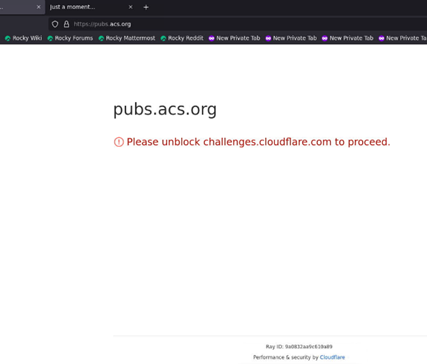
Lastly, we had an exceptionally large incident that affected both campuses that we needed to take an urgent look at. During the weekend, our MIDAS page completely went down and the Shibboleth page for signing into services also went down completely. Users were locked out of many pages now and could not get access to anything through the University. While we know that the team that usually solves this issue is not here on the weekends, we have direct contact with team members that are still online during these periods. During this time, I quickly made my own template about this issue and sent all tickets about this problem over to our Identity Management team who manage both of those pages. I also sent messages and emails to my supervisors to inform them of what is going on right now and what I have done so far regarding my communication with this problem. My supervisors responded quickly and directly messaged members of the Identity Management team to address this issue right away before VIP users start also having problems logging in. Identity Management was quick to respond to them after seeing what was happening with the page and started to deploy fixes to the problem. First, the error message changed and displayed a 500-error code instead of the page completely not loading. Afterwards, it displayed an HTML error message when attempting to login on both Shibboleth and MIDAS. Lastly, the error message changed one more time to another HTML error and one more refresh brought both pages back up. After testing numerous to make sure that the sign ins were working completely fine, I informed my supervisors about the quick work that Identity Management were able to do and also informed all users who were affected about the issue and what we have done in order to fix it. They were happy that the problem was handled nicely and that I reached out to numerous users about the issue. I was finally able to login to MIDAS to start assisting with password resets.
Working for IT at ODU has been a blast these three hundred hours. The position itself was an all-encompassing position that I wanted to do as part of my passion for anything IT. I always wanted to work closely with computers or assist users with problems that were otherwise unsolvable for them. By working for the IT Department, I was working with the entire university and much more when taking a deeper look into the scope of the work I would be doing. Old Dominion University has always been scaling up on software and keeping track of current trends, especially now with our new AI tools. However, troubleshooting has been a key problem for the University since computer usage for classrooms and professors started to rise. The IT Help Desk was opened in 2018 in the Webb Center to assist students and professors with account issues and problems that they could not solve. Eventually, we moved to 1100 Monarch Hall in 2020 after Covid hit the University. Multiple students, professors and even staff were affected from the outbreak, and numerous policies and rules were changed as a result. With more students becoming fully online, the IT Help Desk quickly became the number one contact around the university with technology issues or problems with user accounts or broad questions with the university.
When I noticed the position of being part of the IT Help Desk, I quickly applied and took the position. My interview started well, with me troubleshooting a scenario question about a YouTube video not playing. I responded well, stating that multiple problems could be causing this. From poor internet to Youtube’s own status, there are multiple things to consider with a video not playing and I asked for further information about it. My soon to be supervisor was happy to hear that response and then informed me that a user could not log into their email. I also responded accordingly, asking if the user has ever changed their password or tried logging onto a different device. My supervisor was pleased again and was happy to inform me to come to the office after the interview to discuss my position at the IT Help Desk. After waving goodbye to him, I was excited. I quickly got my best clothes on and went in-person to the IT Help Desk and walked to the briefing room, where I met Stefan. He greeted me and informed me about what I would be doing at the IT Help Desk and informed me about the numerous tasks that will be given to me by his supervisor, being the Help Desk Manager. Stefan informed me that I would be part of the Student Employee Lead position from my accurate answers. The positions were sorted from Student Technician to Student Lead Technician, to Help Desk Part Time Technician, Full Time Technician, Help Desk Lead, Help Desk Manager and then Deputy Chief Information Officer. I was very ecstatic to hear that I would be part of the leads, but there was a lot I had to learn to prepare for my time at the IT Help Desk.
As I started my training, Stefan kept a close eye on me and informed me of certain tools that I was learning to use. From creating templates to accessing logs of calls and even tracking student employee phone status, I quickly learned the ropes under the supervision of my supervisors. My accuracy started to quickly rise as I started to use all my resources, keeping track of any errors I may make and assisting with any problems that come my way while I work my shifts. My most major task was to be a figure at the Help Desk that other student employees could understand, talk with, and ask anything to. I started to make friends quickly with my coworkers and shortly, everyone at the Help Desk knew me in some way or fashion and were asking me about certain issues that they had no solution for.
With me already being keen on cybersecurity, I assisted my colleagues at the Help Desk for any emails that we may receive that look like phishing. I was able to easily point out signs to everyone and even ran phishing sites and files in my sandbox to inform not only the Help Desk but also provide details to any reports that we send to our IT Security team regarding malware or phishing through emails. I also managed to save a user from providing their information to an attacker by calling them directly and telling them not to respond to text messages anymore by them. I quickly informed that user what is going on and that we do not use text messages to send updates about their account or deletion of email through text. The user thanked me for reaching out so fast and was able to avoid sending their MIDAS ID and password to an attacker that could easily have access to all their information in a matter of seconds. After my time at the Help Desk, my skills have only sharpened at this, and I can easily identify phishing the moment it shows up in our ticket bucket. I can even point out newer phishing attempts before they are even sent to IT Security now. An example of which that came in today before being sent to our security team:
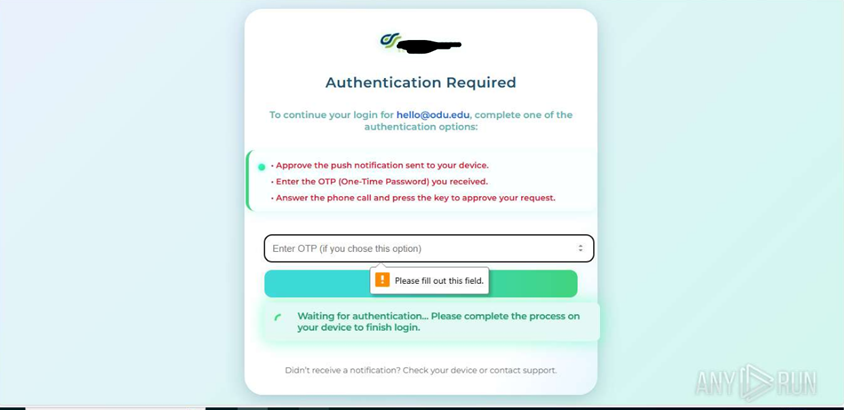
While I have now improved my skills with Cybersecurity from this potion, I was still learning the entire time, especially with my Cybersecurity courses. I learned the importance of never opening anything suspicious and even learned how to gather the information of attackers who attempt to phish employees within the university. I can even assist users who use Linux with certain problems and other devices. I knew exactly what to say with certain issues that arise when a user informs us that they have been compromised, and I am very quickly informing the user what to do after dealing with malware on their system.
The internship itself did a wonderful job at improving my leadership skills overall, while benefiting my problem solving and resolution skills and my communication. I am not that social at all when it comes to talking over the phone or meeting strangers to face, and this position has helped me fight through those feelings of anxiety and nervousness when talking to people online. Even when talking to VIP users like the president of the university or chairs of certain departments, my anxiety faded away as I typed or explained the solution to them. The internship helped me with my lengthy battle of social anxiety and has pushed me out of my comfort zone with what I do. I no longer was the silent person most of the time but now became a very talkative and easygoing person that I am now. I felt like a true leader after solving problems that my coworkers could not and even having the highest accuracy and always being above 90% has been a great feeling I have not had in a while. Every single time I solve a problem for a user, it feels good to me that I am always able to at least bring a smile to their face, knowing that that they won’t have to worry and even learn about what happened and what we did to fix it for them. Being able to help people has been my passion for a while and will continue to be one of my main passions for my life. Seeing people happy, relaxed, calm… it is a great feeling to see that I was able to help them get through the problems they were struggling with. It motivates me every day when I come into the office to see my coworkers and to bring a smile to someone’s day every time.
I will admit, I was still discouraged though with the fact that I was now having to communicate a lot more than I usually do. I never talked as much when I was a kid and was bullied often. Eventually, I developed a bad stutter that would not go away after months of therapy. Even now, I still maintain this stutter, but I try my best to approach things slowly and calmly when on call with a user or when I am talking to someone in person. I felt afraid at first when doing my first password reset and call, afraid of what the user might say if I mess something up. It was discouraging and I had a feeling that Stefan recognized that in me and wanted to push me with this position specifically. It worked, and even while I do stutter often still, I felt much more at ease with talking to people and even making new friends along the way. It feels great to have someone back me up like that when I am at my lowest.
The most challenging part of my internship was the scope of my job. I never knew that I would need to train new student employees about everything I have learned from the Help Desk in my time. It was very scary for me to train those new employees on the job and what tools they have and what to use, but I was able to successfully educate them and get them to go on their new job at the IT Help Desk in just a few days of training. I spent about 28 hours training in total for those employees, covering 10 days preparing them for our test and preparing them for taking on actual calls and tickets.
Recommendations for Future Interns
Before considering this position as an internship opportunity, it is important to know that this position requires critical thinking and lots of problem solving and resolution. Communication is key at the IT Help Desk, and it is important to have a loud voice. As a leader, a louder voice is needed to effectively communicate with everyone about solutions and to help everyone at the Help Desk with tickets, calls, hotline calls and walk-ins. There are numerous things to keep track of and many things to constantly do throughout the shift period. There will never be times when you can watch videos during most shifts. Work will always be busy, and it is important to stay on top of everything that is going on to prevent problems from getting worse overtime. Having great leadership skills before going to this position will heavily assist you when you must take charge of certain incidents or even do training for newer employees at the IT Help Desk. The work can be tough and time management is especially important for the tasks at the IT Help Desk. While the work can be tough and requires a lot of thought, communication with other employees is a great asset, and it is important to always make some talk with your coworkers or supervisors when things are slowed down or if you need any assistance with something. Mistakes are bound to be made, and it is important to not beat yourself up over a mistake. It always happens to everyone, so always keep pushing along. Even in the toughest of times, you will still be a leader throughout those times.
Overall, I had a wonderful time with my experience at the IT Help Desk as a Student Lead Technician. From my time, I learned especially important skills and vastly improved on those that I already had with me. I learned how to be a leader and was able to push my coworkers through times that were far too rough for them to manage on their own. I made many new friends along the way and talked to genuinely nice students, faculty, and staff within the university. I bonded with them and made sure that everything I did would always help them overall while they were here with ODU. My time at the IT Help Desk has expanded my knowledge of the University as a whole and how everything works behind the scenes. The number of teams within the University all share the common goal of making sure that everything is kept up to standard and that they can resolve issues like we do at the IT Help Desk. As the first team of contact with any problem that users may have, we respond accordingly with all the information that we have for the user. The internship has made me realize the importance of critical thinking when it comes to my future as a cybersecurity student with a focus on penetration testing and ethical hacking. Having these skills allows me to perform at much better pace and with my future sights set on being a penetration tester, my communication skills will only get better as I try to sneak into computers and rooms that I’m not supposed to have access to down the line. The internship was an incredibly excellent choice, and I am glad I was able to go through with the position. I hope to continue my work with my career and will do my best to push for my dream goals of being a penetration tester.