It is important to have a basic understanding of how computers work in order to better understand coding or 3-D design. Ultimately, computers do four things: input, store, process, and output (code.org, 2018). There are many ways input can occur; it can be as simple as using a keyboard or a mouse. The computer processes the input and sends it to the storage area to keep it in the computer’s memory (code.org, 2018). Then, the information moves to output, which could be text or even directions sent to make a machine do something, like print.
I focused on 3-D Design over coding. I got inspired to explore 3-D Design after reading the article Making a Place for “3D” in Our School Library by Nathan Sekinger. I had never thought about 3-D printing being a part of the library before reading Sekinger’s article. It is encouraging to students when they can take a created design and bring it to reality. Sekinger (2019) mentioned how students would “spend time outside of school designing in Tinkercad, then come to the library to get their designs printed” (para. 6). Tinkercad is the free 3D design program from this week’s Sandbox.
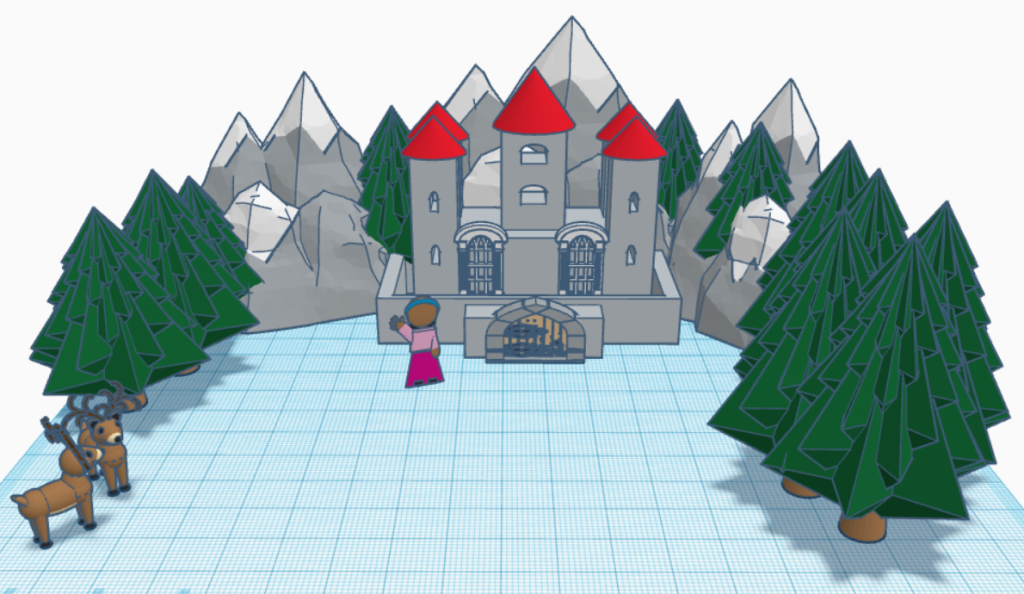
Tinkercad allows users to create 3-D designs, which can be printed on a 3-D printer. Users can choose the 3-D Design option under the Tinker tab at the top of the website. There are many options under the 3-D Design. Users can create something from scratch by choosing Basic Shapes and building using the various shapes offered. If creating something from scratch is a bit intimidating, then a user can choose from the premade items under Creatures & Characters or Structures & Scenery or more. This is the route I took when I created my 3-D design. I created a castle located in snowy mountains with a person and a couple of deer outside of the castle. It was relatively easy to create my 3-D design, but there were some challenges. I could not figure out how to bring an object to the front of the design. For example, I wanted a deer on the mountain, but it could not be seen because it stayed hidden behind the mountain. Tinkercad offers many Resources that I could probably use to find my answers to my questions, like Tips & Tricks or Help Center.
Tinkercad other things besides 3-D Design. Users can go to the Sim Lab and run various simulations to show what objects would do when gravity is introduced to a design. One aspect I love about Tinkercad is the Community Gallery where users can explore other users’ designs. It will amaze and inspire users!
References
Code.org. (2018). How computers work: What makes a computer, a computer? [Video]. YouTube. https://www.youtube.com/watch?v=mCq8-xTH7jA&t=253s
Sekinger, N. (2019, Feb. 28). Making a place for “3D” in our school library. Posted by Filip on IMADE 3D.
Constance, I like your 3D design! It’s very thrilling to see a concept like yours from scratch. I don’t know if I would be able to make something like that. It’s a shame it didn’t work the way you wanted it to though. I think 3D printing will allow more students to dip into a different creative outlet, and it’s even better that what they create can become a real object.
Your 3D design is amazing! I was able to learn about 3D printing in college; however, my mentor encouraged me to create it from scratch. The tedious and preciseness of this creation was quite endearing to me as an adult. It proved to be frustrating on many occasions which, in turn, made my creation more exhilarating. I still own my 3D apple today.
I appreciate that you took the alternative route in learning about 3D printing; I find this premade version to be more student-friendly for younger levels of learning.
One question that I have pertaining to your project is color. When I worked with printing, it would only allow one color filament at a time. Do you find this to still be true? I wonder if this project should be printed in sections of color rather than altogether if the multiple-color filament is an issue. Also, some things to consider about 3D printing are cost and time. A great starter to 3D work is the 3D pens!