Welcome to my CYSE 270 portfolio. This section highlights the hands on labs I completed throughout the course. CYSE 270 provided my foundational understanding of Linux for cybersecurity professionals. Each lab in this portfolio demonstrates not only what I learned, but how I applied those concepts.
Upon graduation, my primary goal is to begin my career in the cybersecurity field, where I can apply my technical knowledge. I aim to pursue an entry level role such as Cybersecurity Analyst, SOC Analyst, or Cybercrime Investigator, where I can continue developing my skills in threat detection, incident response, system hardening, and security monitoring.
I plan to earn additional industry certifications such as CompTIA Security+, and eventually CEH or CHFI. To further strengthen my technical foundation and demonstrate my commitment to professional growth. Long term, I aspire to specialize in digital forensics and cyber investigations, contributing to efforts that uncover evidence, analyze attacks, and support organizations in preventing future threats.
Overall Reflection
This course gave me a solid introduction with Linux and helped me understand how essential it is in cybersecurity. Through hands on labs, I learned how to navigate the command line, manage files and permissions and more. I was able to strengthened my technical abilities, improved my problem solving approach, and gained a clearer view of what it means to think like a cybersecurity professional. This page organizes my work, reflections, and takeaways.
Week 1
Lab 1 focused on installing Oracle VirtualBox and setting up the environment I will use throughout the semester. The installation process went smoothly, and I was able to set up the virtual machine without any issues. This lab helped me prepare my system for the upcoming Linux exercises. We also did basic Linux navigate to get familiar with the Linux system.
Week 2
Lab 2 Working with the Command Line
Experience:
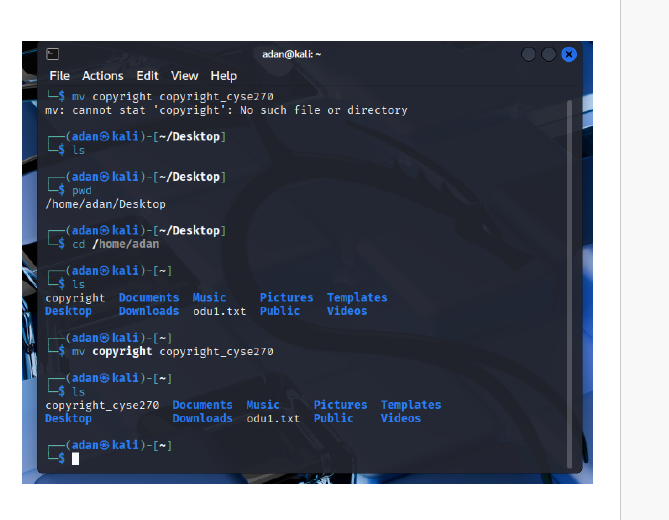
This lab gave me hands on practice using the Linux terminal to navigate the file system and manage files and directories. I worked through each step by running commands directly in the terminal and verifying my progress with the required screenshots. Overall, the lab felt very practical and helped build my confidence working without a graphical interface.
Key Concepts / Skills Learned:
I learned how to move through directories using both absolute and relative paths, list files using different display formats, and use commands like file, tail, ls, cp, mv, rm, and mkdir. I also practiced identifying file types, creating new files, copying directories, renaming them, and performing deletions. This lab reinforced how Linux organizes its filesystem.
Challenges Faced:
One minor challenge was keeping track of the directory structure while switching between paths, especially when moving up or into nested folders. Also understanding the key different of both absolute and relative paths
Overall Takeaways:
This lab strengthened my foundational command line skills, which are essential for cybersecurity. I gained a better understanding of how Linux handles paths, file types, and directory operations. Most importantly, I now feel more comfortable navigating and managing a Linux system using terminal commands.
Week 3
Lab 3 Working with the VI Editor
Experience:
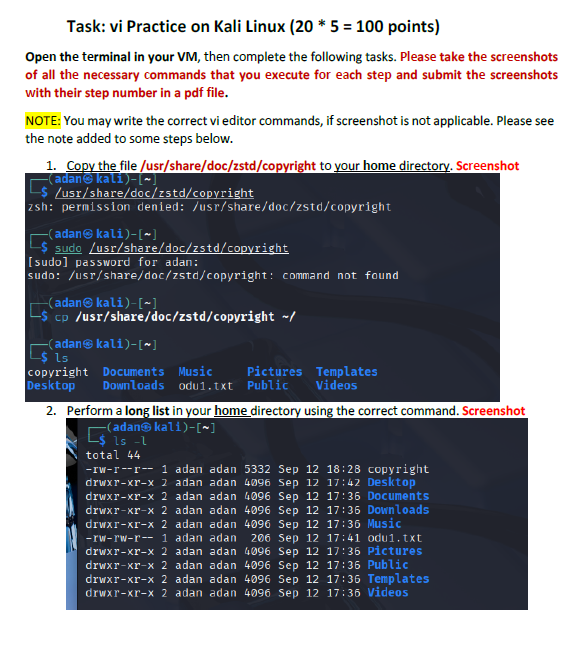
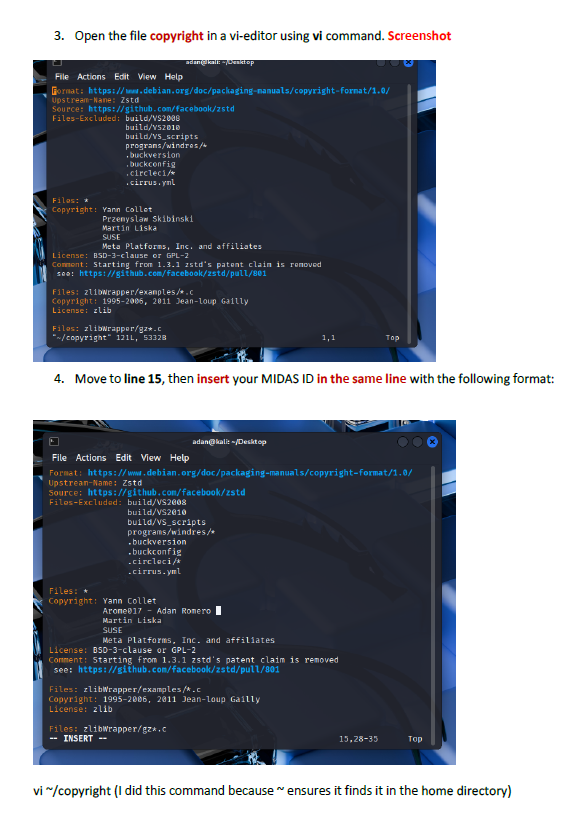
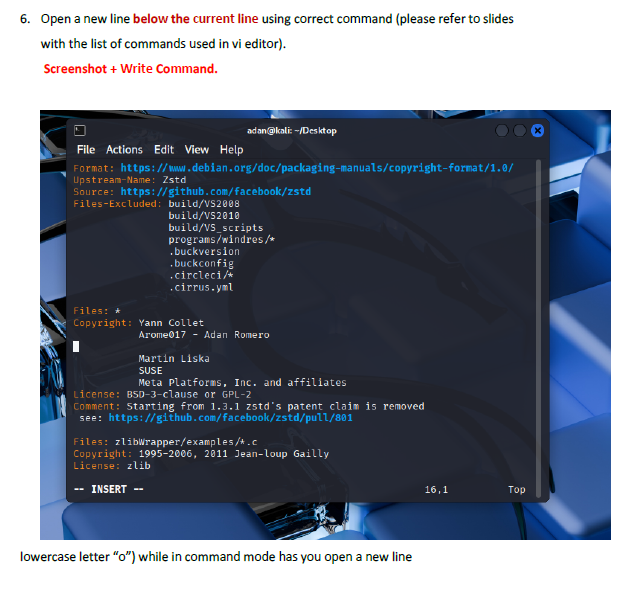
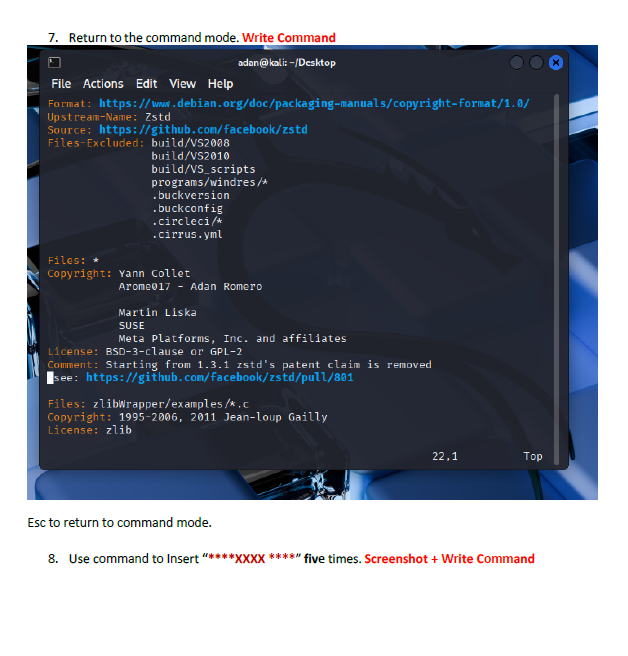
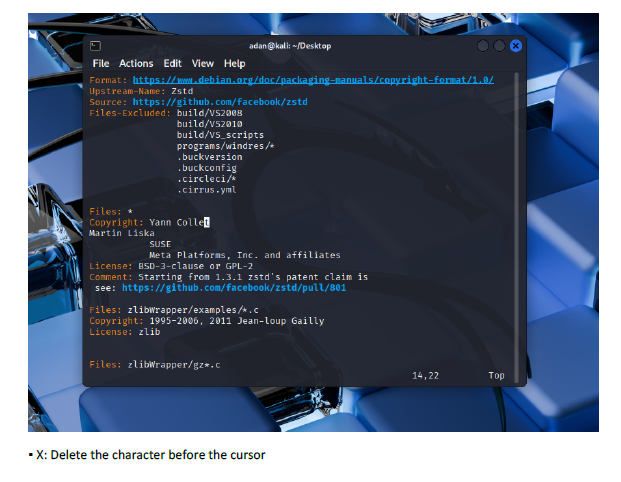
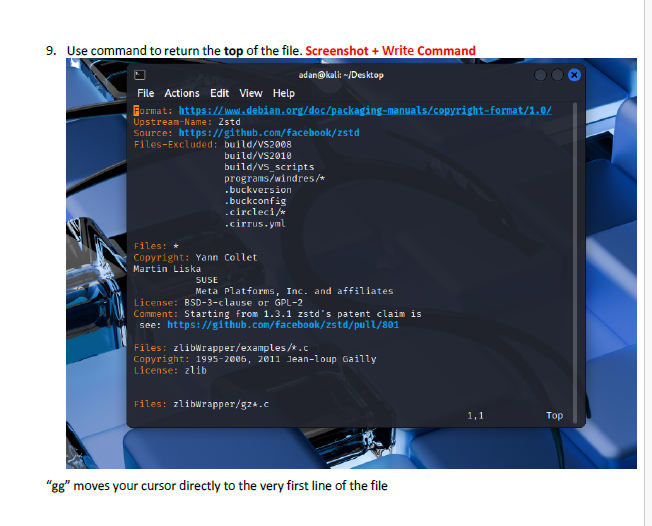
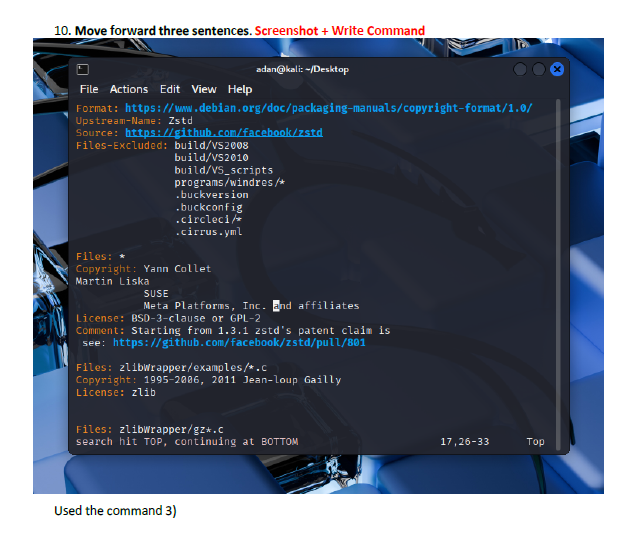
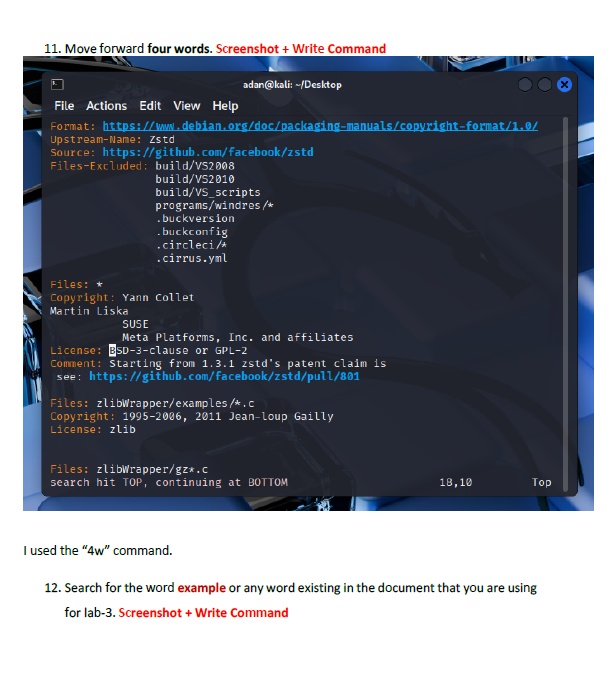
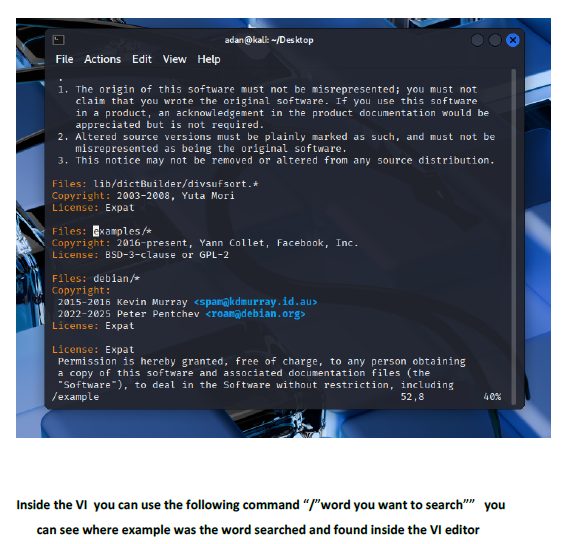
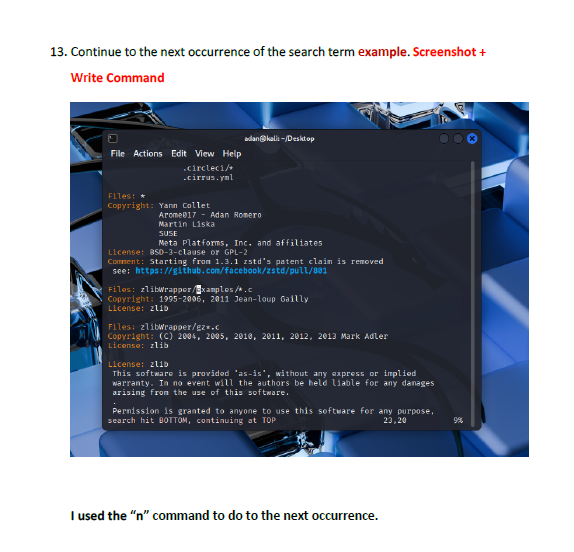
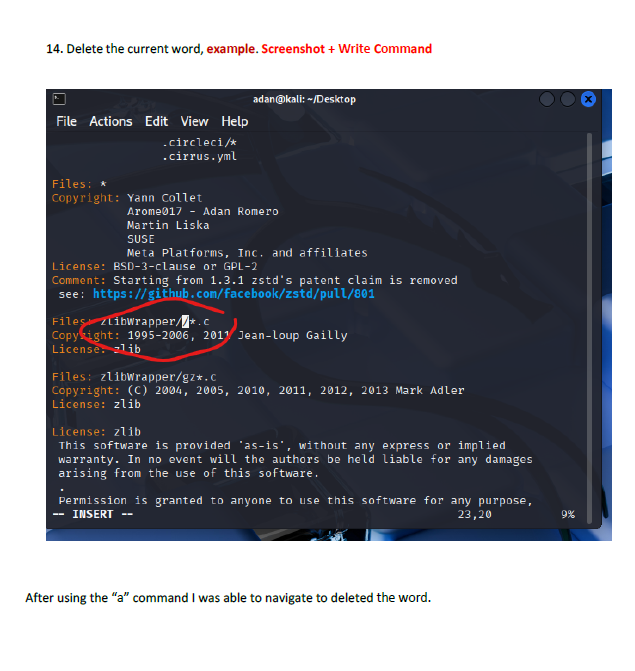
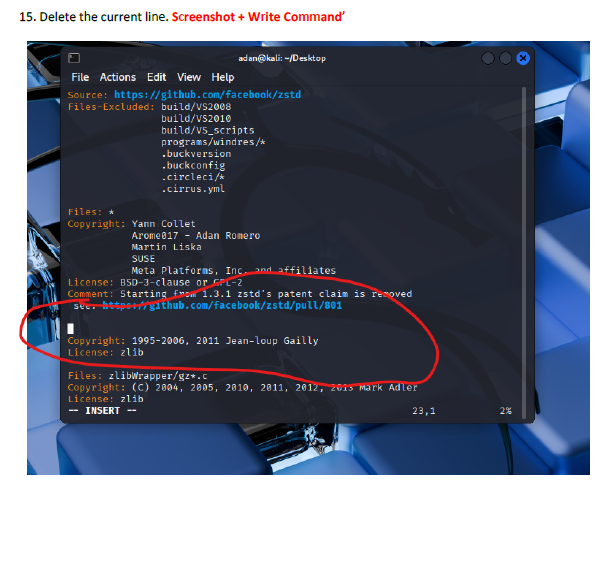
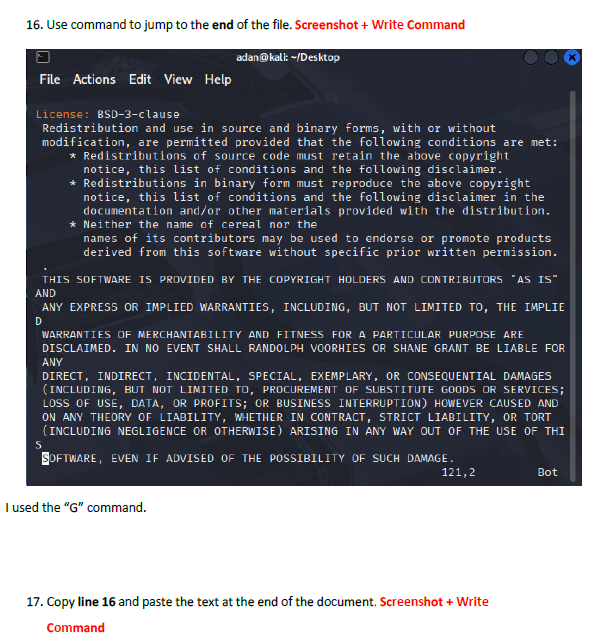
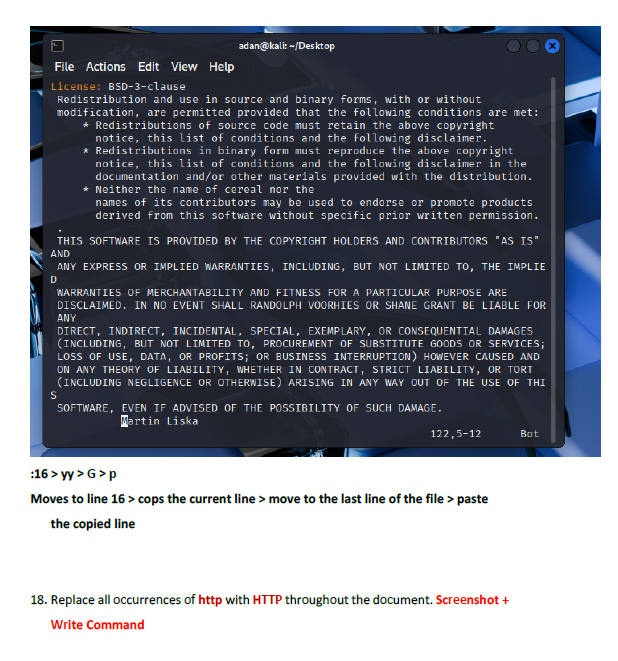
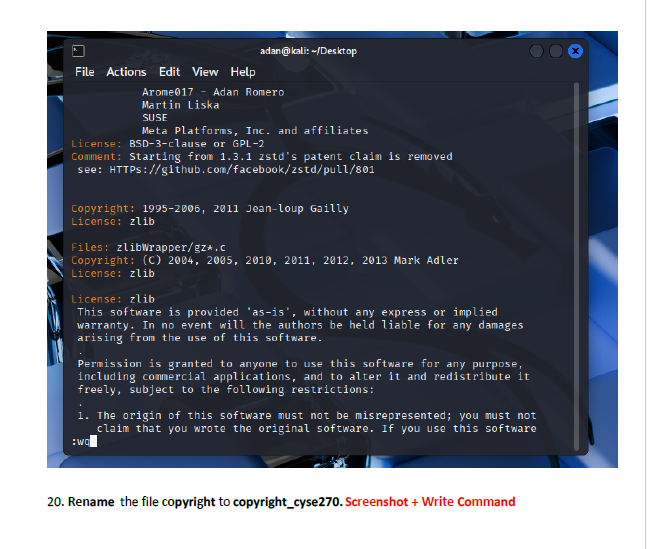
This lab introduced me to working directly inside the VI editor, a powerful but initially challenging tool in Linux. I practiced opening files, navigating through lines and words, inserting text, searching for patterns, and making edits using different modes. Such as copying lines, deleting words, jumping to the top or bottom of the file, and using search functions. This helped me get much more comfortable with how VI operates.
Key Concepts / Skills Learned:
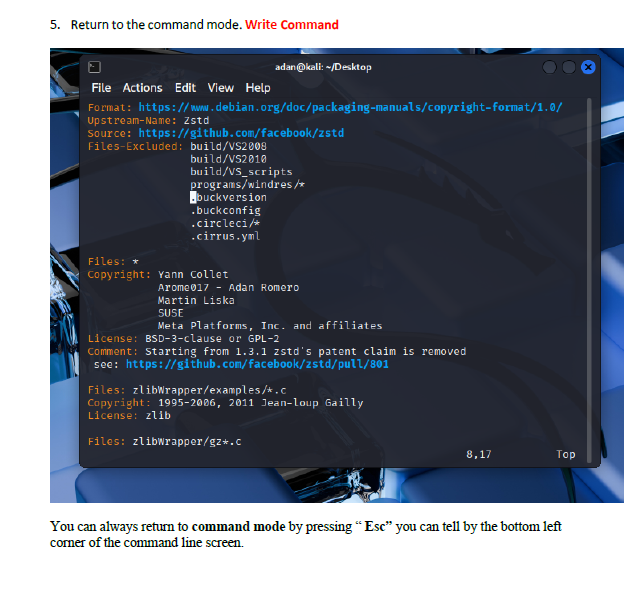
I learned how to switch between insert mode and command mode, which is essential for using VI effectively. The lab also taught me important editing commands such as i, o, gg, G, w, yy, p, and search tools like /word and n. I also gained experience saving changes, quitting the editor, and renaming files from the terminal. These are all core VI skills used by system administrators and cybersecurity professionals.
Challenges:
The biggest challenge was remembering which commands work in which mode. Sometimes I entered a command while still in insert mode, which caused unexpected results. Navigating to specific lines or sentences also required careful attention. However, using the Esc key to reset back to command mode helped me regain control whenever I got lost.
Overall Takeaways:
This lab helped me build confidence using the VI editor, which is a key tool in Linux environments. I now understand how to efficiently edit files without relying on graphical editors.

Week 4
Lab 4 User and Group Account Management
Experience:
This lab focused on managing users and groups in a Linux environment. I used commands to view account details, create a new user, assign a home directory, set a password, and modify login shells. I also worked with group management by creating new groups, editing group memberships, and viewing ownership information for files and directories.
Key Concepts / Skills Learned:
I learned how to work with important system files like /etc/passwd, /etc/shadow, and /etc/group, using grep to filter account information. I practiced using commands such as useradd, passwd, usermod, groupadd, groupmod, and su to manage accounts and permissions. The lab also showed me how to verify ownership of files with ls -l, how to update group membership without overwriting existing groups, and how deleting a group affects file ownership. This concept was demonstrated on page 6, where the file retained a numeric GID even after the group was removed.
Challenges Faced:
One challenge during the lab was keeping track of the different commands and their required options, especially when switching between user-focused tasks and group-focused tasks. Another issue was attempting to switch users after forgetting the newly created password, which prevented the actual su command.
Overall Takeaways:
This lab strengthened my understanding of how Linux manages user identities, group memberships, and permission structures. Overall, I feel more confident in managing user and group accounts in a Linux environment.
Week 5
Lab 5 Password Cracking
Experience:
This lab focused on understanding password cracking. We did this by creating six different user accounts, each with a unique password structure ranging from simple dictionary words to combinations of uppercase letters, digits, and symbols. After creating the accounts and setting their passwords, I attempted to export the hashes and use John the Ripper to crack them using the rockyou.txt wordlist. As shown in the screenshots on pages 3–5, I ran into several issues running John the Ripper, including path errors and incorrect file references, but I worked through them and eventually got the tool running—even though it still did not successfully crack the hashes in this attempt.
Key Concepts / Skills Learned:
I learned how password complexity directly impacts how easily a password can be cracked. Creating users with different password patterns, simple dictionary words, numeric-only passcodes, combined dictionary + digits, and dictionary + digits + symbols—helped reinforce how attackers use pattern-based techniques. I also gained hands-on experience exporting password hashes, reading /etc/shadow, and running John the Ripper with wordlists. The lab showed the importance of file paths and formats when using cracking tools, which was highlighted when John could not locate rockyou.txt even though it was in the home directory.
Challenges Faced:
The biggest challenge came during Task 2, where John the Ripper reported errors such as “No such file or directory” for the wordlist path (visible on page 4). Even with the correct files in the home directory, the tool didn’t properly execute the cracking attempt. Debugging this required checking paths, formats, and file contents multiple times. Even after finally executing John, the tool loaded the hashes but found “0 loaded hashes” for cracking, meaning the formatting or extraction still wasn’t correct. This problem was just a simple incorrect pathway on the command line. A very simple mistake overlooked.
Overall Takeaways:
This lab reinforced how crucial strong passwords are for system security and how easy weak passwords can be to break. It also highlighted the challenges of password-cracking tools, specifically how important file formatting and correct paths are when working with real Linux systems.
Week 6
Lab 6 – File Permissions & Access Control
Experience:
This lab focused on understanding how Linux handles permissions, group ownership, shared directories, and special permission bits. I created multiple users and groups. These were the following: employee, payroll, and admin and then assigned Sophia, Olivia, and Emma to those groups as their primary group (page 2). I also created a shared project group using my MIDAS ID and set it as each user’s secondary group. From there, I set up a shared directory, modified its permissions with octal values, and tested how different users could access files within it. The lab clearly showed how permissions directly control collaboration in Linux.
Key Concepts / Skills Learned:
I learned how to correctly set directory ownership and manage access using chmod, chgrp, and group membership commands. The lab also required adjusting umask values (page 4), which helped me understand how default permissions are applied to newly created files. I saw how SGID (Set Group ID) affects shared directories by ensuring that new files inherit the group owner of the directory (pages 7–8). Later, I learned how removing SGID blocks shared access, and how the sticky bit prevents users from deleting files they don’t own (page 9). These concepts are essential for real-world multi-user environments.
Challenges Faced:
One challenge was keeping track of which user had which group permissions and how those permissions affected access. For example, when switching accounts to test access to Sophia_homework in the shared directory (page 6), Emma received “Permission denied,” demonstrating how restrictive permissions were. After unsetting SGID, Sophia could no longer copy files into the directory, and Olivia couldn’t read them (page 8). Understanding why each result occurred required careful attention to permission bits and ownership values.
Overall Takeaways:
This lab demonstrated how crucial proper permission management is for system security and shared workflow environments. I gained a much deeper understanding of how Linux enforces read, write, and execute permissions for owners, groups, and others. Overall, this lab strengthened my confidence in managing Linux permissions.
Week 7
Lab 7 – Managing Local Storage
Experience:
In this lab, I learned how to inspect, create, and manage storage devices and partitions within a Linux virtual machine. I began by checking the existing storage setup using commands like ls /dev/sd*, fdisk -l, and parted -l (page 2). After that, I added a new 200MB virtual disk to the VM settings and verified that the system recognized it by comparing the before-and-after device lists, where /dev/sdb appeared as a new disk (page 3). I then created a new primary partition, built an EXT4 filesystem on it, mounted it, and tested how files behave before and after unmounting. The lab provided a full walkthrough of how Linux handles disk management from detection to mounting.
Key Concepts / Skills Learned:
I practiced identifying disk devices and partitions, understanding disk labels, and reading partition tables. Using fdisk, I created a new primary partition on the added virtual disk and learned how to format it using mkfs.ext4 (page 4). I mounted the partition under /cyse and verified the mount point with df -h (page 5). I also learned how creating files within a mounted directory writes data to the partition itself, which was demonstrated when the directory appeared empty after unmounting (page 6). Overall, this lab strengthened my skills with partitioning, filesystems, mounting, unmounting, and directory structure behavior in Linux.
Challenges Faced:
The most challenging part was keeping track of how Linux interprets new storage devices and ensuring the correct disk was partitioned. Another challenge was understanding the difference between viewing what is stored on the partition versus in the directory used as a mount point. For example, after unmounting /cyse, the directory appeared empty even though the file arome017.txt existed on the partition itself (page 6). This helped reinforce how mount points act as windows into storage devices rather than containing the data themselves.
Overall Takeaways:
This lab clarified how Linux manages local storage at a low level and showed how system administrators add and prepare new disks. I now understand how to detect devices, partition disks, create filesystems, mount storage and create files on mounted partitions.
Week 8
Lab 8 – Shell Scripting
Experience:
This lab introduced me to writing and running shell scripts in Linux using the vi and nano editors. I created multiple scripts that used conditional statements, user input, and file and directory checks. Task A walked me through writing a script that reads a number and evaluates it using an if statement (pages 1–3), while Task B focused on checking whether an input name referred to a file or directory, displaying its contents, or creating a new file if it didn’t exist.
Key Concepts / Skills Learned:
I learned how to properly format scripts using the shebang (#!/bin/bash), how to read user input with read, and how to apply if/else logic inside a script. The lab reinforced how to test file types using -d and -f, how to display contents with commands like cat, and how to use redirection (>) to write data into files. Making scripts executable with chmod +x and running them with ./scriptname.sh helped me understand script execution flow.
Challenges Faced:
One challenge was ensuring each script was typed correctly, since small syntax issues, such as missing fi or incorrect spacing, can cause scripts to fail. Another challenge occurred in Task B when attempting to execute the script before adding execute permissions.
Overall Takeaways:
This lab showed how powerful shell scripting is for automating system administration tasks. I now understand how to write scripts that make decisions, handle user input, check files/directories, and create new files. Shell scripting is an essential skill in cybersecurity because it allows administrators and analysts to quickly automate repetitive tasks, validate system states, and improve efficiency. Overall, this lab greatly improved my confidence in writing and executing scripts within a Linux environment.
Week 9
Lab 9 Task Automation & System Backups
Experience:
This lab focused on learning how to automate system tasks in Linux using shell scripts and crontab. Even though I was not able to fully complete every step hands-on, I reviewed the procedures and gained an understanding of how scheduled backups work. The lab demonstrated how to create a new user, write a script to back up a home directory using tar, compress the archived file, and then schedule the task to run automatically through cron. Seeing how each piece fit together helped me understand how Linux automates repetitive maintenance tasks.
Key Concepts / Skills Learned:
I learned how tar is used to create tape archives of directories, how to use variables inside a shell script to generate timestamped filenames, and how to move and compress backup files into /var/backups. The lab also introduced the use of crontab -e to schedule automated tasks—specifically, running a backup every few minutes. The extra credit portion taught the logic behind writing a cleanup script that checks the number of backups stored and removes older files when they exceed a set threshold.
Challenges Faced:
The most challenging part would have been configuring the script to run as root and ensuring proper permissions for writing into /var/backups, which is owned by the root user. Automating tasks with crontab can also be tricky because small errors in timing syntax or file paths can cause scheduled tasks not to run.
Overall Takeaways:
This lab emphasized how important automation is in cybersecurity and system administration. Backups, cleanup routines, and scheduled maintenance reduce human error and ensure system reliability. Even though I didn’t fully perform each command, I now understand how cron jobs work and why administrators rely on scripts to maintain system health. Learning the logic behind automated backups and lifecycle management of archived files will be valuable as I continue developing my Linux and cybersecurity skillset.
Week 10
Lab 10 Networking Basics & Subnetting
Experience:
This lab focused on practicing IP subnetting, calculating network information, and understanding how subnet masks affect available host addresses. I worked through two subnetting tables: Task A and Task B. Where I calculated the network address, broadcast address, first usable IP, last usable IP, and maximum number of hosts (page 1). I also converted subnet masks and IP addresses into binary format, which helped reinforce the underlying structure of how networks are divided. Completing these tables required careful attention to binary math and subnet boundaries, but it helped solidify the concepts covered in class.
Key Concepts / Skills Learned:
I learned how to determine the network address by applying the subnet mask, how to find the broadcast address, and how to calculate host ranges within a subnet. This included understanding CIDR notation such as /28 and how many bits are allocated for hosts versus networks. I also practiced converting decimal subnet masks like 255.255.255.192 into binary (page 1), which is essential for understanding how blocks of addresses are grouped.
Challenges Faced:
The most challenging part of this lab was ensuring accuracy when converting binary and calculating host ranges. A single miscalculation in the binary mask or subnet boundary can cause every value in the table to be incorrect.
Overall Takeaways:
This lab strengthened my understanding of how subnetting works and why it is essential in network design. I now feel more confident calculating network ranges, usable IPs, and host capacities for different subnet sizes. These skills are critical for cybersecurity and system administration because proper subnetting helps secure networks, reduce broadcast traffic, and organize IP addressing efficiently.
Week 11