
Overview
This project showcases a hands-on cybersecurity home lab designed to simulate real-world environments for vulnerability scanning and web application security testing. The lab leverages containerized applications and industry-relevant security tools to practice identifying, analyzing, and understanding common vulnerabilities.
The primary goal of this lab is to bridge the gap between theoretical knowledge and practical cybersecurity skills by creating a controlled environment for testing, troubleshooting, and security analysis.
LAB SETUP
- Client System: MacBook Pro
- Host System: Raspberry Pi (Docker Host – ARM 64)
- Network: Local private lab environment
Tools Used
- Docker
- Docker Compose
- Portainer.io
- Pi-hole (DNS Filtering)
- Nessus Essentials
Applications
- OWASP Juice Shop (Port 3001)
- OWASP WebGoat (Port 8081)
- DVWA – Damn Vulnerable Web App (Port 8082)
- MariaDB (Backend database)
What I Did
- Designed and deployed a multi-container lab environment using Docker Compose
- Configured inter-container networking between web applications and a database
- Managed and monitored services using Portainer
- Troubleshot real-world deployment issues:
- Port conflicts
- ARM vs x86 image compatibility
- DNS resolution failures
- Container restart loops
- Performed vulnerability scanning using Nessus Essentials
- Conducted hands-on web application security testing using OWASP tools
- Successfully executed SQL Injection attacks against DVWA to extract database records
Exploit Demonstration: SQL Injection
During testing in DVWA, I exploited a classic SQL Injection vulnerability using the following input:
‘ OR ‘1’ =’1
This payload bypassed application logic and forced the database to return all user records.
Impact:
- Authentication bypass
- Full database enumeration
- Exposure of sensitive user data
This demonstrates how improper input validation and lack of parameterized queries can lead to critical security vulnerabilities.
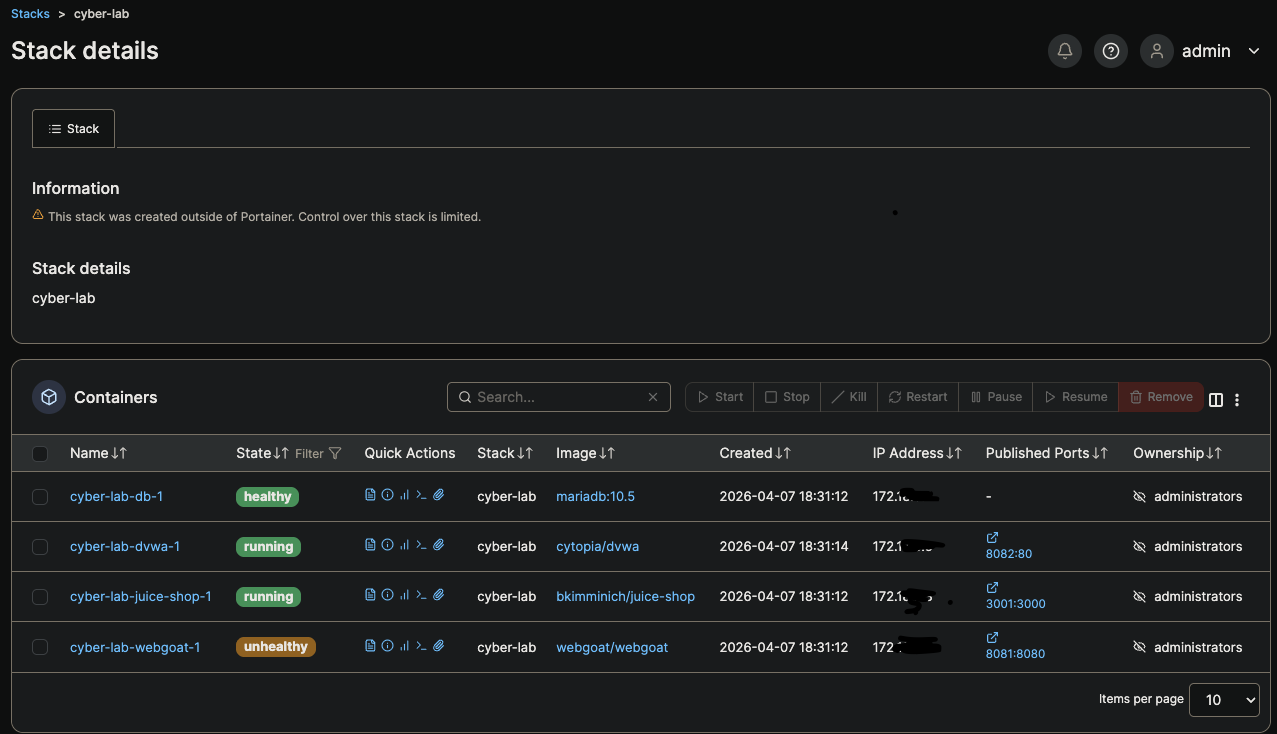
Figure 1: Cyber Lab Stack Deployment in Portainer
This view shows the deployed cybersecurity lab environment managed through Portainer. The stack includes multiple containerized services such as DVWA, OWASP Juice Shop, WebGoat, and a MariaDB backend. Each service is running within a Docker Compose stack, demonstrating container orchestration and service communication.
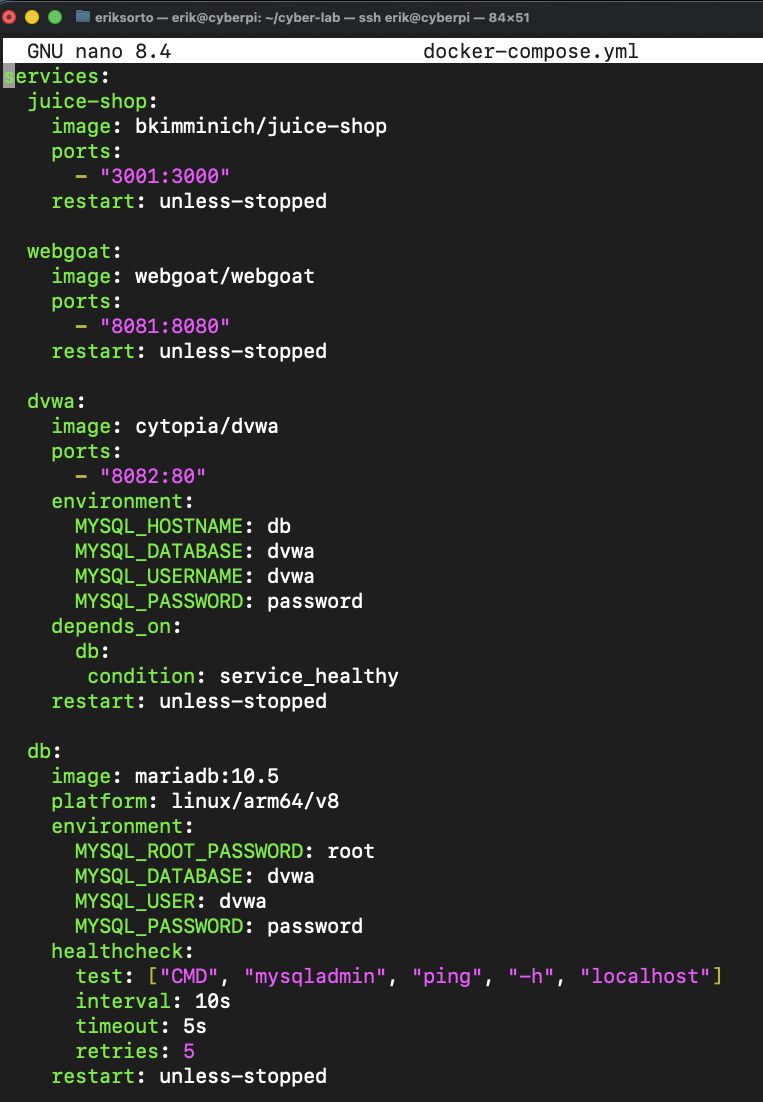
Figure 2: Docker Compose Configuration
The Docker Compose file defines all services in the lab, including vulnerable web applications and the MariaDB backend. It includes:
- Service definitions
- Port mappings
- Environment variables
- Health checks and dependencies
This reflects real-world infrastructure-as-code practices used in modern environments.

Figure 3: OWASP Juice Shop
Juice Shop simulates a modern vulnerable web application and includes common security flaws such as:
- Injection vulnerabilities
- Broken authentication
- Sensitive data exposure
It serves as a realistic target for web application testing.
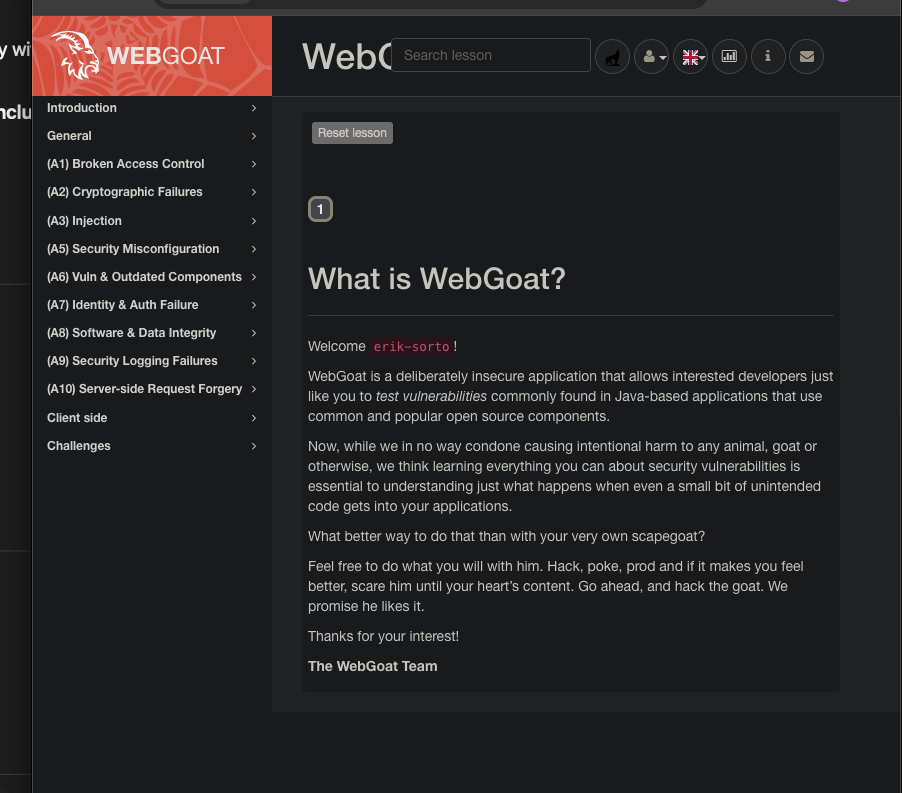
Figure 4: OWASP WebGoat
WebGoat provides structured, lesson-based training on secure coding and vulnerability exploitation, reinforcing theoretical concepts through guided exercises.

Figure 5: DVWA SQL Injection Exploit
DVWA was used to demonstrate hands-on exploitation of SQL Injection vulnerabilities. The lab environment allowed safe testing of attack techniques and analysis of application behavior under malicious input.

Figure 6: Nessus Scan Results
Nessus Essentials was used to scan the lab network and identify:
- Open ports
- Running services
- Potential vulnerabilities
This simulates how security teams assess environments in real-world scenarios.
Key Skills Demonstrated
- Containerization and deployment using Docker
- Infrastructure design using Docker Compose
- Container management using Portainer
- Network troubleshooting and DNS configuration
- Vulnerability scanning and analysis using Nessus
- Web application security testing (OWASP Top 10)
- SQL Injection exploitation
- Debugging real-world system and deployment issues
Conclusion
This homelab provided hands-on experience in building, managing, and securing a containerized environment. By deploying vulnerable applications and actively exploiting them, I gained practical insight into how security weaknesses are identified and abused in real-world systems.
This project demonstrates not only technical knowledge, but also the ability to troubleshoot complex issues, design functional environments, and apply offensive security techniques in a controlled setting.