Course: CYSE 270 – Linux Systems for Cybersecurity
Semester: Spring 2025
Artifact Type: Linux Administration Lab
Lab Overview
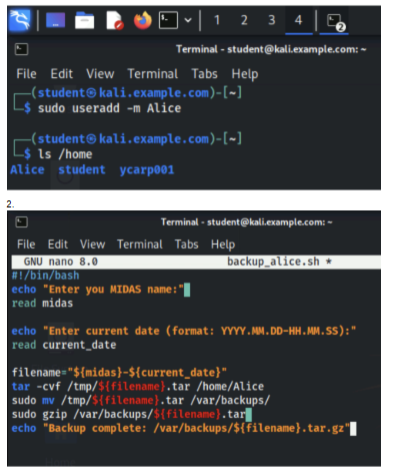
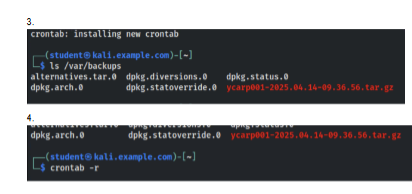
This lab focused on Linux system administration tools to create and automate a backup process. I was tasked with creating a new user and developing a Bash script that backed up the user’s home directory. The script created a dynamically named archive, moved the resulting backup to the /var/backups/ directory, and compressed the file. I then used crontab to schedule the backup process automatically and verified that the scheduled backups were being created successfully.
My Work
I created the Linux user and developed a Bash script to automate the backup process. The script accepted the user input, created variables for the backup filename, used the tar command to archive the user’s home directory, moved the archive to the designated backup directory, and used gzip to compress the resulting file. I also configured a crontab entry to execute the backup task on a schedule and verified the contents of the backup directory to confirm that the automated process was working as intended.
Artifact
Skills Demonstrated
This lab strengthened my Linux system administration skills by giving me hands-on experience creating and automating a system backup process rather than performing the backup manually every time. Automation routine processes such as backups can make administrative tasks more consistent and reduce the need for repeated manual actions.